> For the complete documentation index, see [llms.txt](https://docs.gensyn.ai/llms.txt). Markdown versions of documentation pages are available by appending `.md` to page URLs; this page is available as [Markdown](https://docs.gensyn.ai/testnet/blockassist/using-blockassist.md).
# Using BlockAssist
Use the platform-agnostic guide below to launch BlockAssist after installation, complete tasks, train your models, and upload them via Hugging Face.
## Overview
Use the step-by-step guide below to run BlockAssist, train models, and start contributing to Gensyn's Testnet.
### Logs
Use `tail -f logs/[specific log].log` to monitor progress, and `ls logs` to see options.
{% hint style="info" %}
You might need to press ENTER a few times when prompted.
{% endhint %}
### Running with Python
The program will install various dependencies as required. Follow any instructions and approve all asks.
{% tabs %}
{% tab title="Windows (WSL 2)" %}
Use the following command to run the script on your Windows device:
```bash
python run.py
```
{% hint style="info" %}
You can optionally prefix it with `pyenv exec` if you’re using `pyenv` to manage your Python version.
{% endhint %}
{% endtab %}
{% tab title="Linux" %}
Use the following command to run the script on your Linux device/environment:
```bash
python run.py
```
{% hint style="info" %}
You can optionally prefix it with `pyenv exec` if you’re using `pyenv` to manage your Python version.
{% endhint %}
{% endtab %}
{% tab title="macOS" %}
Use the following command to run the script on your macOS device:
```bash
pyenv exec python run.py
```
{% endtab %}
{% endtabs %}
#### HuggingFace Token
You will be asked to enter a [Hugging Face](https://huggingface.co) API token.
Follow the instructions [in this guide](#huggingface-token), and make sure the token has **Write** access.
#### Logging into Gensyn Testnet
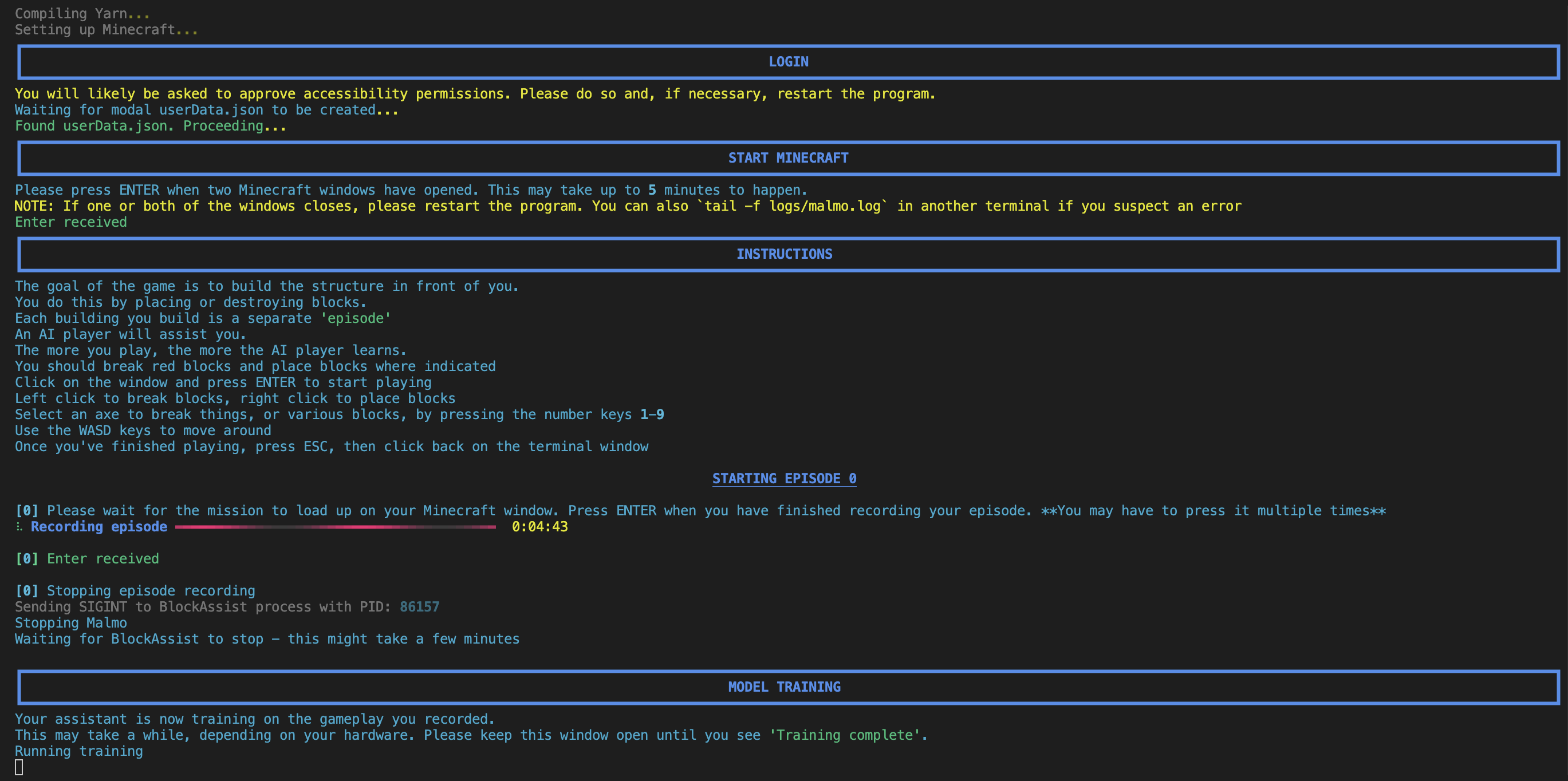
The terminal will show a **LOGIN** section where the system:
* Requests accessibility permissions (approve these if prompted)
* Waits for user authentication data to be created
* Confirms successful login setup
{% hint style="success" %}
If you have previously logged in, it will skip this step. Otherwise, log in using the browser window that just opened.
{% endhint %}
#### Play Minecraft
Next, the terminal will display a **START MINECRAFT** section:
1. Prompts you to wait for two Minecraft windows to open (up to 5 minutes)
2. Do not close either Minecraft window manually. The app manages them.
{% hint style="warning" %}
**Important:** If one or both windows close, restart the program.
{% endhint %}
3. Run `tail -f logs/malmo.log` in another terminal to monitor for errors.
4. Press `ENTER` when both Minecraft windows are open and ready.
### Game Instructions
The objective is to construct the structure in front of you by adding or removing blocks. Each attempt to build is referred to as an "episode." The AI player learns from your actions as you continue to play.
#### Game Controls
* Click on the Minecraft window and press **ENTER** to start playing
* Break red blocks and place blocks where indicated
* **Left click** to break blocks & **right click** to place blocks
* Select tools/blocks by pressing number keys **1-9**
* Use **WASD** keys to move around
* Press **ESC** when finished, then return to the terminal
#### Record an Episode
The terminal will show a **STARTING EPISODE 0** section.
At this stage, the program:
* Waits for the mission to load in Minecraft
* Begins recording your gameplay with a progress bar and timer
* Press `ENTER` when finished to stop recording
{% hint style="warning" %}
**Note:** You may need to press `ENTER` multiple times to stop recording.
{% endhint %}
### Training Process
When the terminal displays the `MODEL TRAINING` section, BlockAssist begins training the AI model based on your recorded gameplay.
This process can take some time depending on your hardware performance, so keep the terminal window open until training completes. You’ll see progress updates and status indicators as the model trains.
A model will now be trained and submitted to Hugging Face and Gensyn's smart contract.
#### Reviewing Logs
If you reach this stage in the logging window, and can see a transaction in the block explorer, then submissions have worked!
Logging Window:
```
[2025-07-28 05:03:48,955][blockassist.globals][INFO] - Successfully uploaded model to HuggingFace: h-grieve/blockassist-bc-bellowing_pouncing_horse_1753675374 with size 20.00 MB
```
You can see the details of the contract & transaction in the [Gensyn Testnet block explorer.](https://gensyn-testnet.explorer.alchemy.com/address/0xE2070109A0C1e8561274E59F024301a19581d45c?tab=logs)
```
huggingFaceID
string
false
h-grieve/blockassist-bc-bellowing_pouncing_horse_1753675374
```
The program will then end. Please close any Minecraft windows if they remain open, but only after you've confirmed the transaction and model upload, or you may lose your training progress.
### Testing & Contributing
Contributions to BlockAssist are welcome, whether through code improvements, testing, or documentation feedback.
The following tools and options help you maintain a **\[1]** consistent and **\[2]** privacy-respecting development environment.
#### Telemetry
Running the following command disables **anonymous usage data** for your session. Paste this in the same terminal before starting the app:
```bash
export DISABLE_TELEMETRY=1
```
To make this change **permanent**, add the same line to your `~/.zshrc`.
{% hint style="danger" %}
Telemetry is completely optional. However, if you disable telemetry, your contributions may not be counted towards the [BlockAssist leaderboard](https://dashboard.gensyn.ai/).
{% endhint %}
#### Linting / Testing
This project uses [Ruff](https://github.com/astral-sh/ruff) to keep code tidy, which sorts imports and auto-fixes simple style issues.
How to run (from the project folder):
```bash
ruff check --select I --fix .
```
If you see `ruff: command not found`, install it once using this command:
```bash
pyenv exec pip install ruff
```
{% hint style="success" %}
If you need additional support, you can [open a ticket](https://github.com/gensyn-ai/blockassist/issues) or [visit our Discord.](https://discord.com/invite/gensyn)
{% endhint %}